


Qualifier Plus IIIx
4.883.00 Reviews
App Specs
- Version
- 10.4.11
- Updated On
- License
- Free
- Downloads
- 10,000+
- Developer
- Calculated Industries
- Categories
- Business
- Platform
- Android
Screenshots
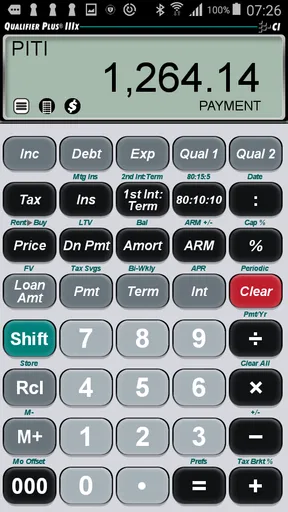
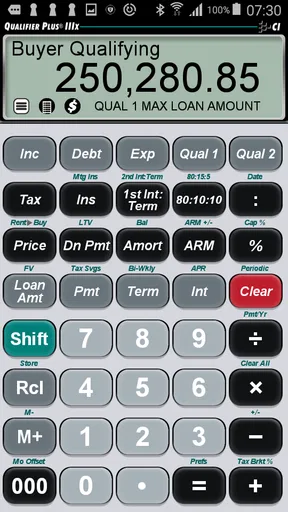
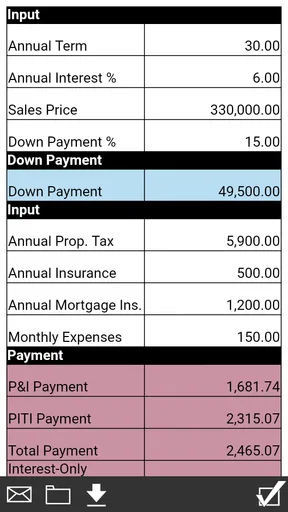
 Analysis by AppCompare
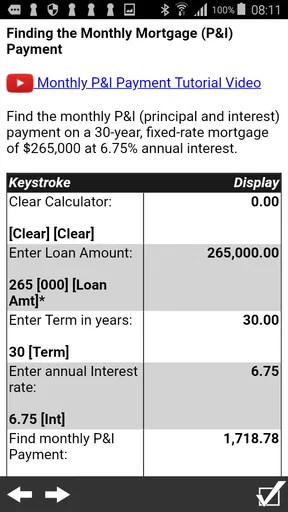
When I need to check whether a mortgage payment fits a real budget, I prefer a focused calculator over a general finance app packed with menus I will never use. Qualifier Plus IIIx takes that narrower route. It is a business app from Calculated Industries built around mortgage-payment calculations, and my impression is that it works best as a practical companion for quick property conversations rather than as a complete home-buying planner.
The app is free to install, which makes trying it straightforward. It is rated for Everyone and runs on Android versions from 6.0 onward, so it is accessible on a wide range of devices. The current version is 10.4.11, and the app has been available since August 6, 2012. Those details matter because this is not a brand-new experiment: it has had time to establish a clear purpose, while its focused design also means you should not expect the broad tools found in a full personal-finance suite.
How the mortgage calculator fits into real decisions
When I use a mortgage calculator, I try to treat each result as one piece of a decision rather than a verdict on whether a home is affordable. That means keeping the assumptions visible and asking which ones are still uncertain, especially when comparing properties or discussing a possible refinance. The next section looks at the small setup checks that help make those comparisons more dependable.
A focused tool instead of a general finance dashboard
In everyday use, I see the main benefit in the speed of testing a mortgage scenario. You can think through a home price, a down payment, an interest rate, and a repayment period without first building a spreadsheet or opening a large budgeting application. That makes the app useful during an open-house visit, a conversation with a lender, or a quiet moment when you are comparing several properties.
The distinction is important. A mortgage calculator answers a payment question; it does not replace a complete affordability review. Your real housing cost can also involve taxes, insurance, association fees, maintenance, utilities, closing costs, and changes in income. I would use this app to create a starting estimate, then verify the result with official loan documents and a lender before making a commitment.
That limited scope is not automatically a weakness. In fact, it can be an advantage when the only question in front of me is, “What would the payment look like if this rate or down payment changed?” A dedicated calculator keeps that question visible instead of burying it under account tracking, credit monitoring, or unrelated financial features.
What the free access gives you
The app is listed as free, so the basic decision to install it does not require a purchase. That is useful for renters considering a first purchase, buyers comparing neighborhoods, and professionals who occasionally need a mortgage estimate without committing to a subscription. I can test whether the workflow suits me before deciding whether it deserves a place in my regular toolkit.
Worth Reading Before You Choose

Flipboard Shows What News Apps Must Do Beyond the Feed

Switching to Android Auto Means Rethinking Your Driving Routine

Google Calendar Makes a Crowded Week Easier to Manage

Ludo King Makes the Most of the Minutes Between Plans

Baby Panda World Brings Quick Play to Modern Phones, but Its Game Library Feels Busy

ESPN’s Live Game View Makes Following Close Games Easier
There are in-app purchases ranging from $0.49 to $29.99 per item. I would treat that range carefully: the free entry point and the optional purchase pricing are separate parts of the value question. The sensible approach is to install the app, see which calculations are available for your needs, and only then decide whether any paid item is worthwhile. I would not assume that every advanced convenience is included in the free experience, nor would I pay simply because a feature sounds useful until I know it solves a problem I actually have.
For someone who checks one or two scenarios during a home search, free access may be enough value by itself. For a mortgage professional or a user who repeatedly prepares estimates, the paid options may deserve closer consideration because time saved can matter more than the small cost of an individual tool. The right choice depends on frequency and workflow, not just the headline price.
Using it during a property comparison
A realistic example is comparing two homes that appear similarly priced but require different down payments. I would enter the first scenario, note the estimated payment, then change only the down payment or interest rate for the second scenario. Keeping one variable at a time makes the comparison more useful than changing the price, term, and rate together and then guessing which factor caused the difference.
Another practical habit is to calculate a conservative case rather than a single optimistic one. If I have a rate range from a lender, I would test the higher end as well as the rate I hope to receive. I would also keep a separate note of the assumptions used, because a calculator result is easy to misread weeks later when I no longer remember whether the figure reflected the asking price, the negotiated price, or a particular down payment.
This is one of the app’s less obvious strengths: it encourages quick scenario testing. The value is not just the first payment figure. It is the ability to ask better follow-up questions, such as whether a larger down payment meaningfully changes the monthly burden or whether a lower-priced property still makes more sense once the financing assumptions are aligned.
Why the developer’s specialization matters
Calculated Industries is the developer, and the app feels like a specialized instrument rather than a social or lifestyle product. That focus should appeal to users who want a calculator designed around a particular professional task. I would be more comfortable using it as a repeat reference than a random calculator with an unclear purpose, especially when I need to perform the same kind of estimate several times.
At the same time, specialization creates expectations. I want the inputs and outputs to be clear, and I want to understand exactly what a result represents before using it in a serious decision. A professional-looking calculator can make an estimate feel more authoritative than it really is. The app should support judgment, not replace it.
Small workflow improvements that make the results safer
My first tip is to label every scenario outside the calculator with the property name or a short description. “House A, larger down payment” is much more useful later than a bare number. This is especially important when several payment estimates are close together and memory starts blending them.
My second tip is to use the app for sensitivity checks, not just confirmation. Instead of asking whether one payment fits, I would test what happens if the rate rises, the price changes after negotiation, or the down payment is smaller than planned. A result that looks comfortable under one assumption may become tight under another, and that difference is often more informative than the initial estimate.
My third tip is to separate the calculator’s mortgage figure from the household budget. I would write the result beside recurring costs and a realistic maintenance allowance rather than treating it as the complete monthly housing cost. This simple separation prevents one of the most common mistakes with mortgage tools: confusing principal-and-interest thinking with total affordability.
Where the app may feel limiting
The narrow purpose can become frustrating if I want an all-in-one financial picture. Someone who expects automatic budget categories, account connections, credit analysis, document storage, or a detailed home-buying checklist may find a dedicated mortgage calculator too small for the job. In that situation, a broader finance application or a spreadsheet may be the better primary tool, with this app used only for quick calculations.
I would also avoid treating any calculator as a substitute for a lender’s estimate. Loan offers can include costs and conditions that a simple payment figure does not communicate. Even when the arithmetic is correct, the decision can still be wrong if the inputs are incomplete or outdated. The app is most useful when I know what I am testing and can independently confirm the assumptions.
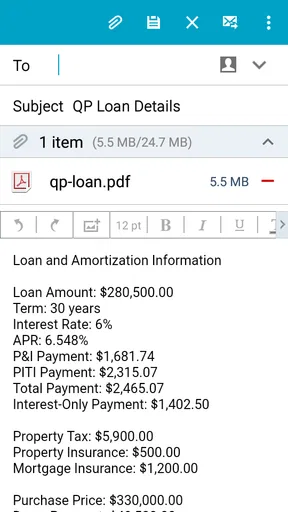
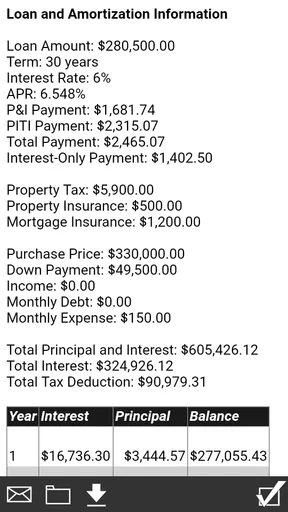
There is also a difference between convenience and record keeping. If I need a formal, shareable report for a client or a detailed audit trail of every assumption, I may prefer a spreadsheet or professional mortgage software. Qualifier Plus IIIx is better suited to working through possibilities quickly than building a complete financial file.
Who will get the most value
First-time buyers are a natural audience. The app gives them a way to turn a home price into a more concrete payment discussion before they speak with a lender. It can help reveal that a small change in rate or down payment deserves attention, and it can make conversations with family members more specific than simply saying a property “seems affordable.”
Real-estate professionals and loan-related workers may also appreciate the focused format when they need a quick estimate in the field. The app’s value for them depends on how closely its workflow matches their daily process and whether they need more formal reporting. For occasional client conversations, a compact calculator can be convenient; for regulated documentation or comprehensive analysis, it should remain a supporting tool.
Homeowners considering refinancing can use it to explore whether a different rate or term might change the payment enough to justify further investigation. I would still compare the estimate with closing costs, the remaining loan balance, and the length of time I expect to keep the property. A lower payment alone does not prove that refinancing is financially beneficial.
Students, renters, and anyone learning how mortgages work may also find the app useful because changing one assumption at a time makes the relationship between price, rate, and payment easier to understand. The important lesson is to treat the output as an illustration, not a promise.
Who should choose something else
I would skip this app as a primary solution if my goal is a complete household budget. A budgeting application is more appropriate when I need to combine housing with groceries, transport, debt payments, savings, and irregular expenses. Likewise, a spreadsheet is a stronger choice when I want custom formulas, side-by-side scenario tables, notes, and a permanent record that I control.
I would also look elsewhere if I need a collaborative process involving several people who must edit and review the same assumptions. A mortgage calculator is convenient for individual checks, but a shared document can be clearer when a couple, adviser, or family member needs to see the reasoning behind each scenario.
Finally, users who dislike entering assumptions manually may prefer a broader service that combines mortgage estimates with property data or lender information. The trade-off is that broader services may introduce more complexity, while a focused calculator keeps the calculation itself at the center.
What the ratings and reach suggest
The app holds a 4.8 average from over 385 ratings, with more than 83 written reviews. It has also passed 10K+ installs. Those figures suggest that the focused approach has connected with a meaningful group of users, and the strong average is encouraging for anyone looking for a dedicated mortgage tool rather than a general finance app.
I would still read that reputation in context. A high rating can tell me that users appreciate the app’s purpose, but it does not guarantee that the interface will suit every workflow or that the calculator covers every loan situation. The best test is whether I can enter my own scenario comfortably and understand the result without guessing what the number includes.
My value judgment
For a free app, the strongest value is the low-risk way it lets me explore mortgage scenarios before making a larger financial decision. I do not need to build a spreadsheet for every quick question, and I can use the same focused tool when a rate, price, or down payment changes. That convenience is meaningful during a fast-moving property search.
The possible paid items change the calculation for heavier users. I would consider paying only when an available purchase directly improves a repeated workflow, saves enough time, or provides a calculation I genuinely need. I would not describe the paid range as automatically good or bad value; the benefit depends on what each item adds for the specific user and how often that need occurs.
My final verdict is positive but deliberately limited: I recommend Qualifier Plus IIIx to anyone who wants a dedicated mortgage-payment calculator for quick, repeatable estimates. It is especially sensible for first-time buyers, homeowners exploring refinancing, and professionals who need a compact calculation aid. I would skip it as my only financial tool if I needed comprehensive budgeting, formal loan analysis, or collaborative record keeping.
Use it to ask sharper mortgage questions, not to make the mortgage decision by itself. That is where I think this app earns its place: as a practical calculator that turns changing assumptions into understandable comparisons, while leaving the full affordability judgment to you, your budget, and the official figures from your lender.
Pros
- Supports advanced scientific calculations and complex equations.
- Includes programmable functions for customized calculations.
- Offers multiple display formats for fractions
- decimals
- and results.
- Useful for engineering
- mathematics
- and technical coursework.
- Works offline
- so calculations are available without mobile data.
Cons
- The interface may feel dated compared with modern calculator apps.
- Advanced features can take time to learn without the manual.
- Not ideal for users who only need basic arithmetic functions.
- Some menus and settings may be difficult to navigate at first.
- Device compatibility may vary on newer Android versions.
FAQs for Qualifier Plus IIIx
What is Qualifier Plus IIIx used for?
Qualifier Plus IIIx is a specialized calculator designed primarily for students and professionals working with algebra, trigonometry, statistics, finance, and other advanced mathematical operations. It is especially useful when you need more than a basic calculator, offering functions such as fractions, equation solving, conversions, and scientific calculations in a portable format.
Is Qualifier Plus IIIx suitable for school and college students?
Yes, Qualifier Plus IIIx can be helpful for high-school, college, and technical students who regularly solve scientific or financial problems. Its dedicated keys and broad collection of functions make common calculations faster than using a standard calculator. However, beginners may need some time to learn the layout and should check whether their school or examination rules permit this type of calculator.
Does Qualifier Plus IIIx work without an internet connection?
The core calculator functions are generally designed to work offline, so you can use the app without creating an account or maintaining a constant internet connection. This is convenient for classrooms, commutes, and locations with limited coverage. Internet access may still be required for downloading the application, receiving updates, or accessing external support and store information.
Is Qualifier Plus IIIx easy to use on a phone or tablet?
The app provides many dedicated mathematical and financial functions, but its interface is more practical than visually modern. Users familiar with handheld calculators will likely understand it quickly, while newcomers may need to consult the built-in instructions or experiment with the keys. On smaller phone screens, entering complex expressions can feel less comfortable than on a tablet.
Are there any limitations or costs to consider before downloading Qualifier Plus IIIx?
Before downloading Qualifier Plus IIIx, check the current store listing because availability, pricing, supported operating systems, and in-app purchase details can change. The app is focused on calculation rather than lessons, graphing, or step-by-step tutoring, so it may not replace a full mathematics learning tool. Also verify compatibility with your device and any calculator requirements for your course or exam.


